nara or ManageEngine ServiceDesk Plus
Service desk and client management in one product. The AI resolves the requests.
With ManageEngine, these are two products, each with its own license: ServiceDesk Plus for the service desk and Endpoint Central for the devices. nara includes both in one price per employee, with unlimited IT agents. The AI takes requests in Teams and by phone and resolves them itself, right down to the laptop. Within one to two weeks, nara runs alongside ServiceDesk Plus.
The difference in brief
ManageEngine's ServiceDesk Plus is licensed per technician, and from Professional also per IT asset. Service catalog, problem and change management are included only in Enterprise, the Zia AI in every edition. [1] Software distribution and patches come from Endpoint Central, a separate product licensed per endpoint. [2]
nara is an AI-native ITSM with every module and client management in one price per employee, with unlimited IT agents. The AI resolves requests from Teams, phone and the portal in your systems and on the device. You set it up in your own words, without consultants. nara runs alongside ServiceDesk Plus within one to two weeks and, if you want, replaces it in about six weeks, with your ticket history.
Comparison at a glance
Information on ServiceDesk Plus and Endpoint Central comes from ManageEngine's public sources. The numbered sources are listed at the end of the page.
nara
AI-native ITSM
ServiceDesk Plus
As of October 2026
Problem and change management, service catalog
Yes, included in the price
In Enterprise; add-ons in Standard and Professional, from $1,595 per module per year in the cloud [1]
CMDB, asset and license management
Yes, CMDB with discovery
Client management: software distribution, patches, inventory
Included, through nara Edge on Windows, macOS and Linux, plus Windows installation
License model
Per employee, every module, unlimited IT agents
Per technician, from Professional also per IT asset; end users free [1]
AI agents that resolve requests
Yes, in Teams, by phone, in the portal, by email and on the device
Requests by phone
A dedicated phone number and Teams calls; nara recognizes the caller and resolves the request during the call
Microsoft Teams
Chat, calls and approvals
Teams bot for tickets, approvals and Zia; an on-premises installation must be reachable from the internet over HTTPS, directly or through Azure Application Proxy [8]
Systems without an API
Yes, through nara Edge, without open ports
Zia Agents connect third-party systems through API tools; according to ManageEngine, the agent can use any tool that has an API [9]
Setup
In your own words, without consultants or programming
Operation
Cloud in Germany; for large enterprises also entirely in your own data center, AI included
AI data
Processing exclusively in the EU, no training on customer data
Getting started
Alongside ServiceDesk Plus in 1–2 weeks, full switch in about 6 weeks
Depends on the project; for its own implementation projects at large organizations, ManageEngine lists 3 to 18 months [13]
Where nara and ServiceDesk Plus overlap
If you use ServiceDesk Plus, you will find the building blocks you know in nara. That makes the move easy.


AI for technicians and employees.
Zia categorizes and prioritizes tickets, summarizes conversations, suggests solutions and writes knowledge articles. Zia Agents take on tasks such as first-level support and can be built from a description, without code. [9][10] nara also drafts knowledge articles from solved tickets and works with AI agents. The difference is how far the AI takes a request on its own.

Beyond IT.
ServiceDesk Plus runs up to 15 service desk instances for other departments. [1] nara automates workflows across the company, from onboarding with HR to purchase approvals in procurement.

Cloud or your own data center.
ServiceDesk Plus is available as a cloud service with EU data centers in Amsterdam and Dublin, and for your own data center. [12] nara runs in the cloud in Germany and carries out actions in your network through nara Edge. For large enterprises, nara can run entirely in your own data center, AI included.
Where nara leads
Client management is included.
nara distributes software and patches, installs Windows and keeps the inventory, through nara Edge on Windows, macOS and Linux. It is part of the ITSM price. With ManageEngine, software distribution and patches come from Endpoint Central, a separate product with its own license per endpoint and its own technician seats. [2] Devices reported by Endpoint Central become IT assets in ServiceDesk Plus, which count toward the license from Professional. [1][4]
The AI sees the request through.
An employee writes in Teams that Windows updates have been failing for days. nara checks disk space and the update service through nara Edge, clears the update cache, restarts the installation and closes the ticket with its findings. You decide which steps need approval. According to ManageEngine, the L1 agent of the on-premises version analyzes the request, searches the knowledge base and sends the relevant solution by email. [9]
Employees ask wherever they are.
In Teams chat, group chats and channels, by Teams call, on a normal phone number, in Slack or in the nara app, in their own language. On the phone, nara recognizes the caller and unlocks the account or resets the password during the call. Anyone who prefers a person presses 0. The ServiceDesk Plus telephony integration shows technicians the caller and up to five open tickets, and in the cloud it is limited to Enterprise. [6]
Every system, with or without an API.
A new colleague starts on Monday. nara creates her account in Entra ID, assigns the Microsoft 365 license, adds her to the right teams and distribution lists and orders the laptop in the procurement system. nara operates systems without an API through nara Edge, which only opens outbound connections. According to ManageEngine, Zia Agents connect directly to ManageEngine and Zoho products; you connect third-party systems such as Entra ID through your own API tools. [9]
Set up in your own words, without a project.
You describe forms, SLAs, approvals, permissions and workflows the way you would explain them to a colleague. nara builds it, shows every step, tests it in a simulated run and only goes live after your approval. Your team learns it in days. For implementation projects ManageEngine itself delivered at organizations with 1,000 to 120,000 users, the vendor lists 3 to 18 months. [13]
Start without switching systems.
In the first one to two weeks, nara works alongside ServiceDesk Plus: it takes tickets, resolves them and documents every case in ServiceDesk Plus. As long as your ManageEngine contract runs, you pay nothing for nara's ITSM, for up to 12 months. When you switch, we move your ticket history, knowledge articles and assets, from the cloud or from your own data center. The full switch takes about six weeks.
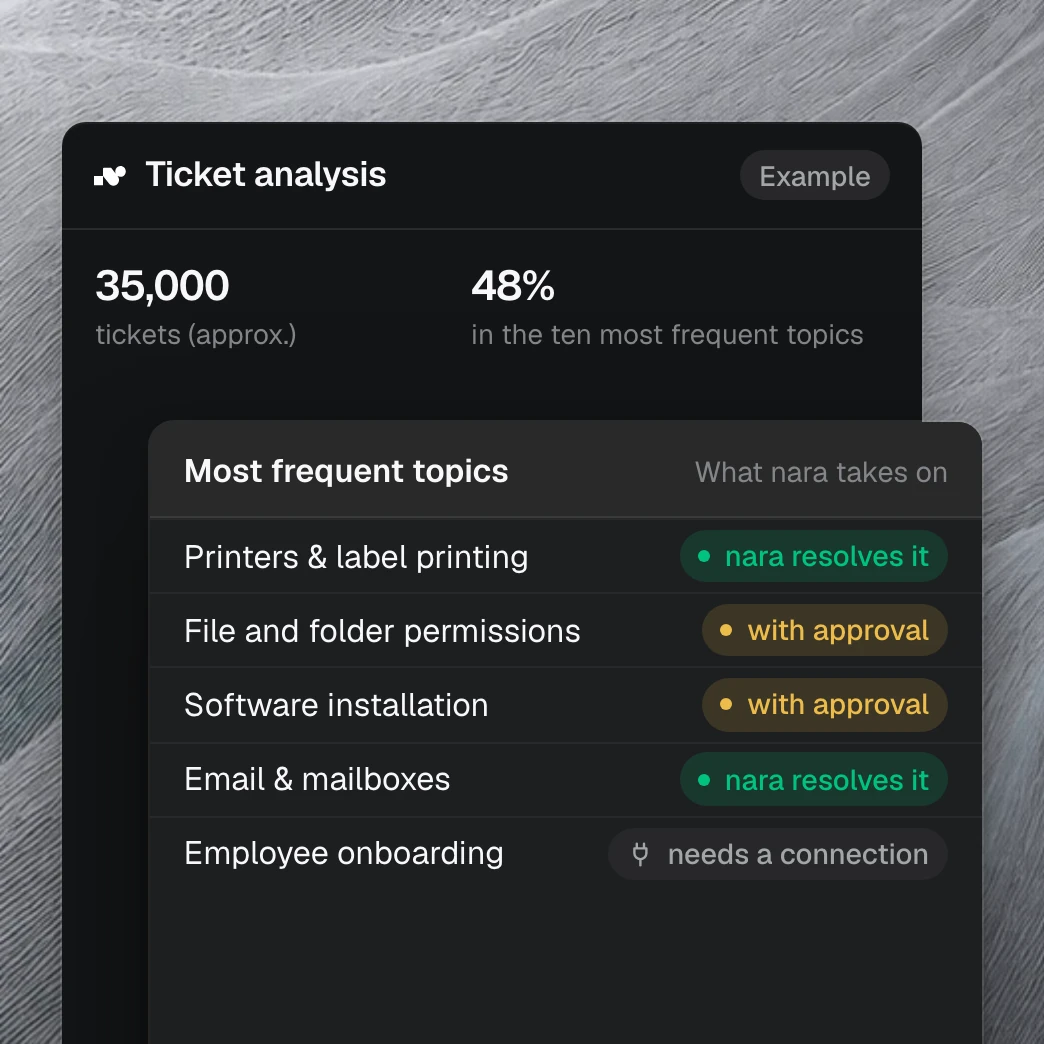
Your tickets show what nara takes on.
With read access to your ServiceDesk Plus history, we show within one to two weeks which requests nara handles from day one and how much time your team gets back. It draws on more than 40 million tickets we have analyzed in customer projects.
How ServiceDesk Plus and nara charge
In the cloud, ServiceDesk Plus costs from $13 (Standard), $27 (Professional) or $67 (Enterprise) per technician per month, billed annually, and from Professional also per IT asset. In Standard and Professional, service catalog and problem management cost $1,595 per year each. [1] Endpoint Central Professional costs $1,045 per year for 50 endpoints in the cloud. [2]
nara: ITSM at €2.50 per employee per month (€1.75 from the 1,001st employee) with every module including client management and unlimited IT agents, plus a nara plan from €1,500 per month, plus migration at a fixed price per quote. All prices exclude VAT. As long as your old ITSM contract runs, you pay nothing for the ITSM, for up to 12 months.
Questions about nara and ServiceDesk Plus
Yes. nara includes a ticket system, self-service portal, service catalog, problem and change management, SLAs, CMDB with discovery, asset and license management, plus client management, every module in one price. The AI resolves requests itself in Teams, by phone and on the device.
Sources
manageengine.com, Service desk software pricing (ServiceDesk Plus), prices as of September 2026, with price calculator, and the German-language pricing page, both retrieved 13 Oct 2026.
manageengine.com, Endpoint Central Pricing & Plans, retrieved 13 Oct 2026.
manageengine.com/de, ServiceDesk Plus edition comparison (German), retrieved 13 Oct 2026.
manageengine.com, Features of Endpoint Central - ServiceDesk Plus integration, retrieved 13 Oct 2026; Integrate with ServiceDesk Plus Cloud, updated 8 Jul 2026.
manageengine.com, ServiceDesk Plus On-Premises ReadMe, builds 15220 (26 Dec 2025), 15310 (11 Aug 2026) and 16000 (23 Sep 2026), retrieved 13 Oct 2026.
help.sdpondemand.com, Cloud Telephony Integration, retrieved 13 Oct 2026.
manageengine.com, What's new in ServiceDesk Plus Cloud, releases of 4 Sep 2025 and 14 Sep 2026, retrieved 13 Oct 2026.
help.sdpondemand.com, Microsoft Teams Integration; help.servicedeskplus.com, Integration with Microsoft Teams; both retrieved 13 Oct 2026.
manageengine.com, Zia Agents for service desk, retrieved 13 Oct 2026.
manageengine.com, AI for ITSM (ServiceDesk Plus), retrieved 13 Oct 2026.
help.sdpondemand.com, Custom Functions, retrieved 13 Oct 2026.
manageengine.com, Know Your Datacenter and GDPR-ready help desk software, retrieved 13 Oct 2026.
manageengine.com, ServiceDesk Plus professional services, retrieved 13 Oct 2026.
manageengine.com, press release “ManageEngine Unveils its Biggest Generative AI Release Yet for ServiceDesk Plus”, 23 Sep 2025.
manageengine.com, Half-yearly roundup of 2026 releases (ServiceDesk Plus), retrieved 13 Oct 2026.
