nara or n8n
Automation your team doesn't have to build and maintain.
With n8n, technical teams build workflows and AI agents from nodes and code, and look after connections, error handling and upkeep themselves. nara comes with a complete service desk, including a ticket system, approvals and an audit trail. The AI resolves requests in Teams, by phone and right on the laptop, and you describe your processes in your own words.
The difference in brief
n8n is a Berlin-based platform that technical teams use to build workflows and AI agents visually and with code, connecting more than 500 applications, in the cloud or self-hosted. [1][2] It has no ticket system with SLAs and a CMDB; for that, n8n connects to systems such as ServiceNow or Jira. [4]
nara is an AI-native ITSM that automates processes across your company. The AI takes requests in Teams, by phone and in the portal, resolves them in your systems and on the device, and records every step in the ticket. You describe workflows, approvals and permissions in your own words; nara builds them, tests them and only goes live after your approval. Existing n8n workflows can keep running.
Comparison at a glance
Information on n8n comes from n8n's public documentation, pricing page and legal pages. The numbered sources are listed at the end of the page.
nara
AI-native ITSM
n8n
As of October 2026
What you get
A ready-made service desk and automation across your company, ITSM and AI in one product
A platform on which you build and run workflows and AI agents made of nodes and code [1]
Ticket system, portal, service catalog, SLAs, change, CMDB
Yes, every module in one price
Not included; nodes for ServiceNow, Jira, Freshservice, Zendesk and others [4]
Setting up workflows
In your own words; nara builds, tests in a simulated run and goes live after your approval
In the visual editor from nodes, with JavaScript or Python where needed; n8n Assistant creates workflows from a description, as a preview [5]
AI resolves requests
Yes, from request to resolution, in your systems and on the device
AI Agent node in workflows; standalone agents with model, instructions and tools in preview [6]
Approvals
You decide which steps need approval; approvals happen in Teams, by email, by phone or in the portal
Approval before an AI agent's tool calls, for example through Slack, Teams, Gmail or Outlook; set up in the workflow for all tools or selected ones [7]
Microsoft Teams
Chat, group chats and channels, calls and approvals; nara app in the Microsoft Store; also in Slack
Requests by phone
A dedicated phone number and Teams calls; nara recognizes the caller, unlocks accounts and resets passwords during the call
Through providers such as Twilio; the Twilio node sends SMS and places calls that play a text-to-speech message [10]
Fixes on employees' devices
Yes, through nara Edge on Windows, macOS and Linux
Audit trail
Every action recorded in the ticket
Execution logs in the cloud for up to 7 days (Starter), 30 days (Pro) or unlimited (Enterprise); audit logs and log streaming on the Enterprise plan [12]
Operation
Cloud in Germany, actions in your network through nara Edge; for large enterprises also entirely in your own data center, AI included
AI data
Processing exclusively in the EU, no training on customer data
Billing
ITSM €2.50 per employee per month (€1.75 from the 1,001st), nara plan from €1,500 per month
By executions; cloud from €20 per month for 2,500, Business self-hosted €667 per month for 40,000, billed annually; Enterprise on request [12]
Getting started
Alongside your existing system in 1–2 weeks, full switch in about 6 weeks
Try the cloud free for 14 days; you then build the service desk on top, one workflow at a time [2]
Where nara and n8n overlap
Both automate workflows across several systems, and in both, AI agents work with approvals. The difference lies in what comes ready to use and what your team builds and looks after.


AI agents with tools
In n8n, you choose the model, instructions and tools for each agent yourself. [6] In nara, the AI is ready to use and works with the systems and permissions you grant it.

Human approvals
Both pause before sensitive actions and ask first. n8n sends the request through Slack, Teams or email, for example. [7] nara asks in Teams, by email, by phone or in the portal.

From text to workflow
n8n Assistant turns a description into a workflow made of nodes and tests and changes it on request; you review and publish it. The Assistant is a preview. [5] With nara, describing a process is how you set it up and change it.
What you build and run yourself with n8n
n8n lists these points in its documentation. Some apply only if you host n8n yourself.
Where nara leads
Tickets, SLAs and CMDB are already there.
Ticket system, self-service portal, service catalog, problem and change management, SLAs with queues and escalation, email-to-ticket, CMDB with discovery, license management and knowledge base are one product at nara. The AI works directly in it and records every action in the ticket. With n8n, you connect workflows to a ticket system that you run separately. [4]
You describe the process. nara builds it.
“When someone leaves the company, lock their account at 6 p.m. on their last day and get HR’s approval first.” From that sentence, nara builds the process, shows every step, tests it in a simulated run and only goes live after your approval. n8n Assistant, a preview, produces a node workflow that your team is responsible for and, according to n8n, should always review before production use. [5]
Employees message or call.
In Teams chat, through a Teams call, on a normal phone number, in the portal, by email or in the nara app. On the phone, nara recognizes the caller and unlocks the account or resets the password during the call. Anyone who prefers a person presses 0. With n8n, you connect telephony through providers such as Twilio, whose node sends SMS or places calls that play a text-to-speech message. [10]
nara works right down to the laptop.
An employee reports in Teams that her VPN hasn't connected since the last update. Through nara Edge, nara checks the network and the VPN client, resets the connection and closes the ticket with its findings. nara Edge runs on Windows, macOS and Linux and only opens outbound connections. In n8n, commands run on the machine that runs n8n, over SSH or through the API of a device management tool. [11][19]
nara and n8n side by side
You don't have to switch anything off to start with nara.

Your n8n workflows keep running.
What your team has built in n8n stays in operation. nara takes over the service desk and the processes that need approvals. You decide later what moves.

n8n starts tasks in nara.
An n8n workflow calls nara through its REST API, for example to create a ticket or start an onboarding. Approvals and the audit trail still apply. n8n's HTTP Request node calls any REST API. [19]

nara starts n8n workflows.
As one step in a process, nara calls an n8n workflow through its webhook and writes the result into the ticket. n8n's Webhook node starts workflows from an HTTP call. [19]
What it costs
n8n bills by executions, meaning runs of a workflow. In the cloud, Starter costs €20 per month for 2,500 executions and Pro starts at €50 for 10,000. Business is available self-hosted only, at €667 per month for 40,000 executions; Enterprise is on request. Prices billed annually. [12] On top come a ticket system, telephony, model costs and the effort of building and maintaining workflows.
nara: ITSM at €2.50 per employee per month (€1.75 from the 1,001st employee) with every module and unlimited IT agents, plus a nara plan from €1,500 per month, plus migration at a fixed price per quote. All prices exclude VAT. As long as your old ITSM contract runs, you pay nothing for the ITSM, for up to 12 months.
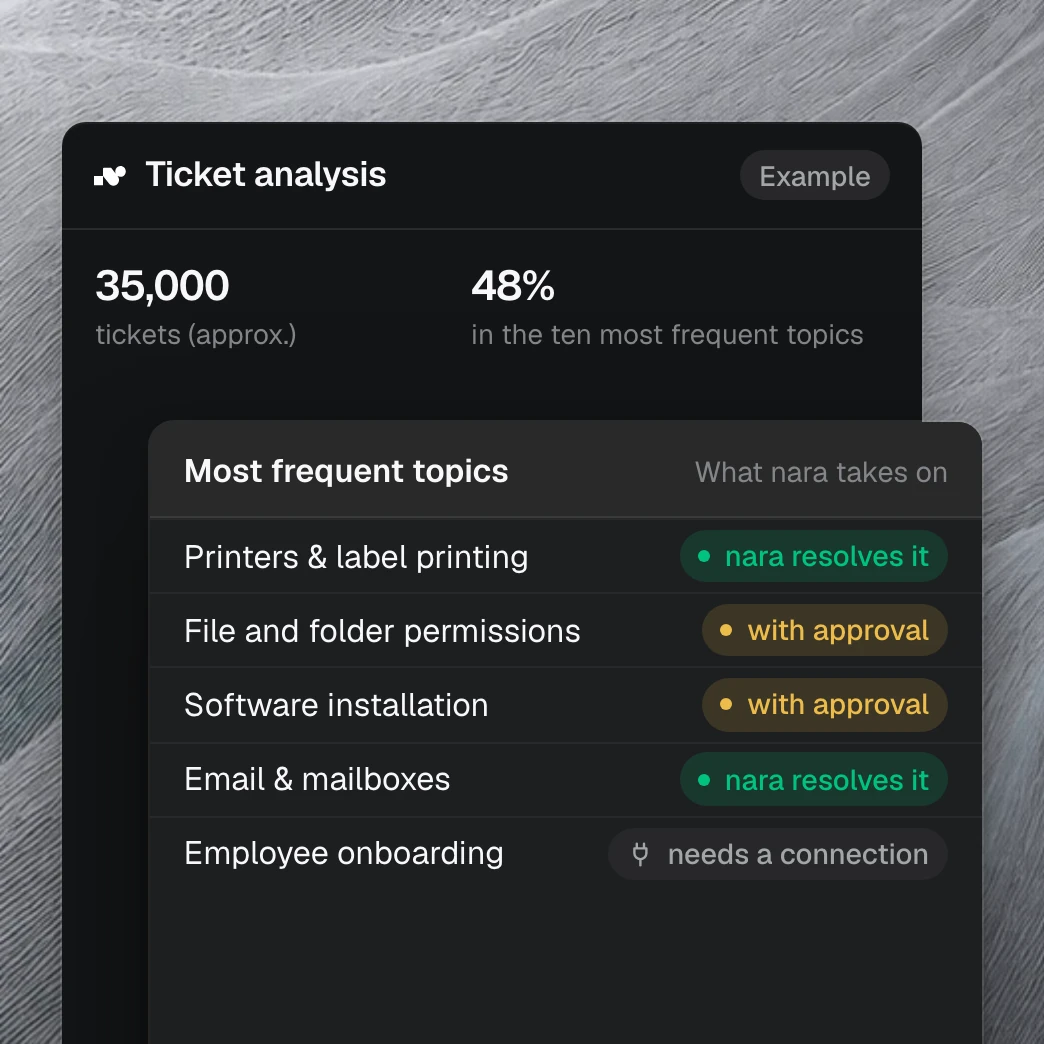
Your tickets show what nara takes on.
With read access to your ticket system, we show within one to two weeks which requests nara handles from day one and how much time your team gets back. It draws on more than 40 million tickets we have analyzed in customer projects.
Questions about nara and n8n
Yes, for the service desk and for processes with approvals that your team doesn't want to build and run itself. nara comes with a ticket system, portal, SLAs, CMDB and an AI that resolves requests in Teams, by phone and on the device. You set up processes in your own words. Existing n8n workflows can keep running and work with nara.
Sources
docs.n8n.io, Choose how to use n8n.
github.com/n8n-io/n8n, Releases, version 2.43.8 of 19 Oct 2026; blog.n8n.io, Introducing n8n 2.0, 8 Dec 2025.
docs.n8n.io, node documentation for ServiceNow, Jira Software, Freshservice and Zendesk.
docs.n8n.io, Use n8n Assistant, Use n8n MCP server and Code node.
docs.n8n.io, Build and manage agents.
docs.n8n.io, Human-in-the-loop for tools.
docs.n8n.io, Microsoft Teams node and Microsoft Teams Trigger.
docs.n8n.io, Microsoft Agent 365 Trigger.
docs.n8n.io, Twilio node.
docs.n8n.io, Execute Command and SSH.
n8n.io/pricing, pricing page with FAQ; docs.n8n.io, Changelog, entry of 1 Sep 2026 on error workflows.
docs.n8n.io, Deploy to AWS, section Self-hosting knowledge prerequisites.
n8n.io/legal/sub-processors, updated 22 Sep 2026.
docs.n8n.io, Privacy.
docs.n8n.io, Handle errors gracefully.
docs.n8n.io, Update n8n and Back up and restore.
docs.n8n.io, v3.0 Breaking changes.
docs.n8n.io, HTTP Request node and Webhook node.
docs.n8n.io, Community license and License FAQ.
n8n.io/workflows, IT Ops category.
docs.n8n.io, Ollama Chat Model and Microsoft Foundry Chat Model, formerly Azure OpenAI Chat Model.
blog.n8n.io, Introducing n8n Agents, 25 Sep 2026.
