nara or Copilot Studio
The IT support agent you don't have to build first.
With Copilot Studio, you build agents yourself and connect them to a ticket system, telephony and your applications. nara comes with all of that ready to use: a complete ITSM and an AI that resolves requests in Teams, by phone and right on the laptop. You set it up in your own words, and within one to two weeks nara is working in your Teams.
The difference in brief
According to Microsoft, Copilot Studio is a low-code tool for building AI agents and workflows and connecting them to your data and systems. [1] For IT support, you design the knowledge, workflows, connections and, if you want, telephony yourself. A ticket system with SLAs and a CMDB is not part of it. Microsoft describes its prebuilt Employee Self-Service agent as a front end for ServiceNow, where it creates IT tickets. [13]
nara is an AI-native ITSM with every module in one price. The AI takes requests, resolves them in your systems and on the device, and records every step in the ticket. You set up nara in your own words, without consultants or developers. nara runs alongside your existing ticket system within one to two weeks and, if you want, replaces it in about six weeks, with your ticket history.
Comparison at a glance
Information on Copilot Studio comes from Microsoft's public documentation and pricing page. The numbered sources are listed at the end of the page.
nara
AI-native ITSM
Copilot Studio
As of October 2026
What you get
A ready-made service desk: ITSM and AI in one product
A tool for building your own agents and workflows; design, connections and operation are up to you [1]
Ticket system, self-service portal, service catalog
Yes
Not included; connects to an ITSM, in the Employee Self-Service agent through ServiceNow [2]
Problem and change management, SLAs, CMDB with discovery, license management
Yes, every module in one price
Not included
Setup
In your own words, without consultants, developers or programming
For the Employee Self-Service agent, Microsoft lists six roles up to a change control board, plus representatives from HR, IT and legal [3]
Microsoft Teams
Chat, calls and approvals
Requests by phone
A dedicated phone number; nara recognizes the caller, unlocks accounts and resets passwords during the call
Applications without an API
Yes, part of the product
Fixes on employees' devices
Yes, through nara Edge on Windows, macOS and Linux
Billing
ITSM €2.50 per employee per month (€1.75 from the 1,001st), nara plan from €1,500 per month
AI data
Processing exclusively in the EU, no training on customer data
Operation
Cloud in Germany; for large enterprises also entirely in your own data center, AI included
Microsoft cloud, with data centers in Germany available [11]
Getting started
Alongside your existing system in 1–2 weeks, full switch in about 6 weeks
Depends on the project; for the Employee Self-Service agent, Microsoft's playbook plans about 12 weeks to a pilot group as a guideline [14]
Where nara and Microsoft Copilot overlap
Many building blocks exist on both sides: agents in Teams, answers from your knowledge, tickets and workflows with approvals. The differences lie in who builds and runs the service desk, and how far the AI takes a request on its own.


Answers from your knowledge
The Employee Self-Service agent answers questions from SharePoint and from knowledge articles in ServiceNow. [2] nara uses your knowledge from SharePoint and Confluence, writes new articles from solved tickets and shows where articles are missing.

Creating and tracking tickets
The Employee Self-Service agent creates tickets in ServiceNow, adds to them and reports their status. [13] nara manages tickets in its own ITSM or in your existing system, such as ServiceNow, Matrix42, Jira or Freshservice.

Workflows with approvals
In Copilot Studio, you build workflows as agent flows; multistage approvals in them are a preview. [16] With nara, you describe workflows in your own words and decide which steps need approval. Approvals happen in Teams, by email, by phone or in the portal.
Taking calls
Copilot Studio voice agents take calls through a phone number from Azure Communication Services. [5] nara has a dedicated phone number and answers calls in Teams.
AI for the IT team
Copilot in Intune summarizes policies, analyzes error codes and compares devices for administrators. [19] With nara, the IT team works with the same assistant that resolves employee requests, right on the ticket.
What you build and run yourself with Copilot Studio
Microsoft's sample scenario for an IT helpdesk agent answers questions, creates tickets, checks their status and hands over to a person. Microsoft says it is for demonstration purposes only, and it gives no effort estimate. [12] For a service desk in daily use, Microsoft's documentation adds the following.
Knowledge and workflows
You create knowledge, topics and workflows, then test and publish them. [1]
Connectors
You connect your ticket system, Entra ID and business applications through connectors. The Employee Self-Service agent includes connectors for ServiceNow, Workday and SAP SuccessFactors; you still need licenses for those systems. [3]
Phone
For the phone, you need a number through Azure Communication Services and a connection to Dynamics 365 Contact Center. [5]
Capacity
You allocate credits, monitor consumption and avoid a shutdown at 125% of prepaid capacity. [6]
Sign-off
A change control board signs off on architecture, data protection and AI policies. [3]
An ITSM alongside
On top, you license and maintain an ITSM with a ticket system, SLAs, change management and a CMDB.
Where nara leads
A service desk that is already built.
Ticket system, self-service portal, service catalog, problem and change management, SLAs with queues and escalation, email-to-ticket, CMDB with discovery, license management and knowledge base are one product at nara. The AI works directly in this system: it takes the request, resolves it and documents every step in the ticket. With Copilot Studio, you build the agent and connect it to an ITSM that you run separately. [2] Microsoft describes the Employee Self-Service agent as a front end for ServiceNow: it creates, reads and updates incidents there. [13]
Live in one to two weeks, in your employees’ language.
nara works alongside your existing ticket system after one to two weeks, in German, English and many other languages, and resolves requests from day one. For the Employee Self-Service agent, Microsoft's playbook plans about twelve weeks as a guideline until a pilot group of about 5 to 10% of employees gets answers, and recommends connecting ServiceNow tickets only after that. So far, the scenarios are formally validated only in English, Microsoft recommends testing other languages yourself before rollout, and Microsoft is rolling out the new version in waves. [2][14]
The AI resolves requests across all your systems.
A new colleague starts on Monday. nara creates the account in Entra ID, assigns the Microsoft 365 license, requests the ERP role and orders the laptop in the procurement system. nara collects approvals in Teams. This works with or without an API, for HR and procurement workflows as well. Copilot Studio also operates applications without an API, through computer use on a Windows machine set up for the purpose. By default, computer use runs with the maker's credentials; if you share the agent, every user acts with those permissions. [7]
One call is enough.
Employees call nara in Teams or dial a normal phone number. nara recognizes the caller and unlocks the account or resets the password during the call. Anyone who prefers a person presses 0. In Copilot Studio, the phone number comes through Azure Communication Services, and each minute of conversation costs 10, 35 or 75 credits, depending on the voice tier. [5][6] The direct route through Teams Phone is a Frontier program preview, and Microsoft says previews are not intended for production use. [4]
Fixing the laptop is part of it.
An employee reports in Teams that the Windows update on their laptop has been failing for days. nara checks disk space and the update service through nara Edge, clears the update cache, restarts the installation and records the result in the ticket. nara Edge runs on Windows, macOS and Linux and only opens outbound connections. Computer use in Copilot Studio works on Windows machines you register for it; Microsoft recommends dedicated, isolated machines with minimal permissions. [7][8]
Systems in your own data center, too.
Many workflows end in systems in your own data center, such as an ERP system or an older business application. nara reaches them through nara Edge with an outbound connection and no open firewall ports. Microsoft says that connecting Workday, ServiceNow or SAP SuccessFactors takes time and typically needs deep technical expertise. [15]
Set up in your own words, without a development project.
You describe workflows, forms, approvals and permissions the way you would explain them to a colleague. nara builds it, tests it and only goes live after your approval. Ticket, SLA and audit log are already there, and you need neither developers nor consultants. For Microsoft's Employee Self-Service agent, the documentation lists six roles for deployment, from global admin and maker to a change control board, plus representatives from HR, IT and legal. [3]
Your data stays in Germany and the EU.
nara is developed and hosted in Germany. AI processing takes place exclusively in the EU, and we don't use your data for training. With Copilot Studio in a German environment, Azure OpenAI runs within the EU Data Boundary, while Microsoft processes Bing search data in the US. [10] Anthropic's Claude models, which Copilot Studio also offers for computer use, are excluded from the EU Data Boundary and switched off by default in the EU. [7][18] Microsoft does not use your data to train the Azure OpenAI foundation models. [10]
What it costs
With Microsoft, you pay for the agents' work in Copilot Credits: €173.30 per month for 25,000 credits, or pay-as-you-go through an Azure subscription. On the standard harness, a generative answer costs 2 credits, an agent action 5, a computer use step 5 or 15 and a minute of conversation 10 to 75. Employees with a Microsoft 365 Copilot license (€26 per user per month, billed annually, plus VAT) use internal agents on the standard harness at no extra cost under fair use, except for computer use. [6][9] Agents on the GitHub Copilot harness are billed by tokens, tools and the harness itself, from the moment you start building, and not through the license. [20]
Not included are the ticket system with SLAs and CMDB, telephony through Azure and Dynamics 365 Contact Center, and the work of building, securing and running the agent.
nara: ITSM at €2.50 per employee per month (€1.75 from the 1,001st employee) with every module and unlimited IT agents, plus a nara plan from €1,500 per month, plus migration at a fixed price per quote. All prices exclude VAT. As long as your old ITSM contract runs, you pay nothing for the ITSM, for up to 12 months.
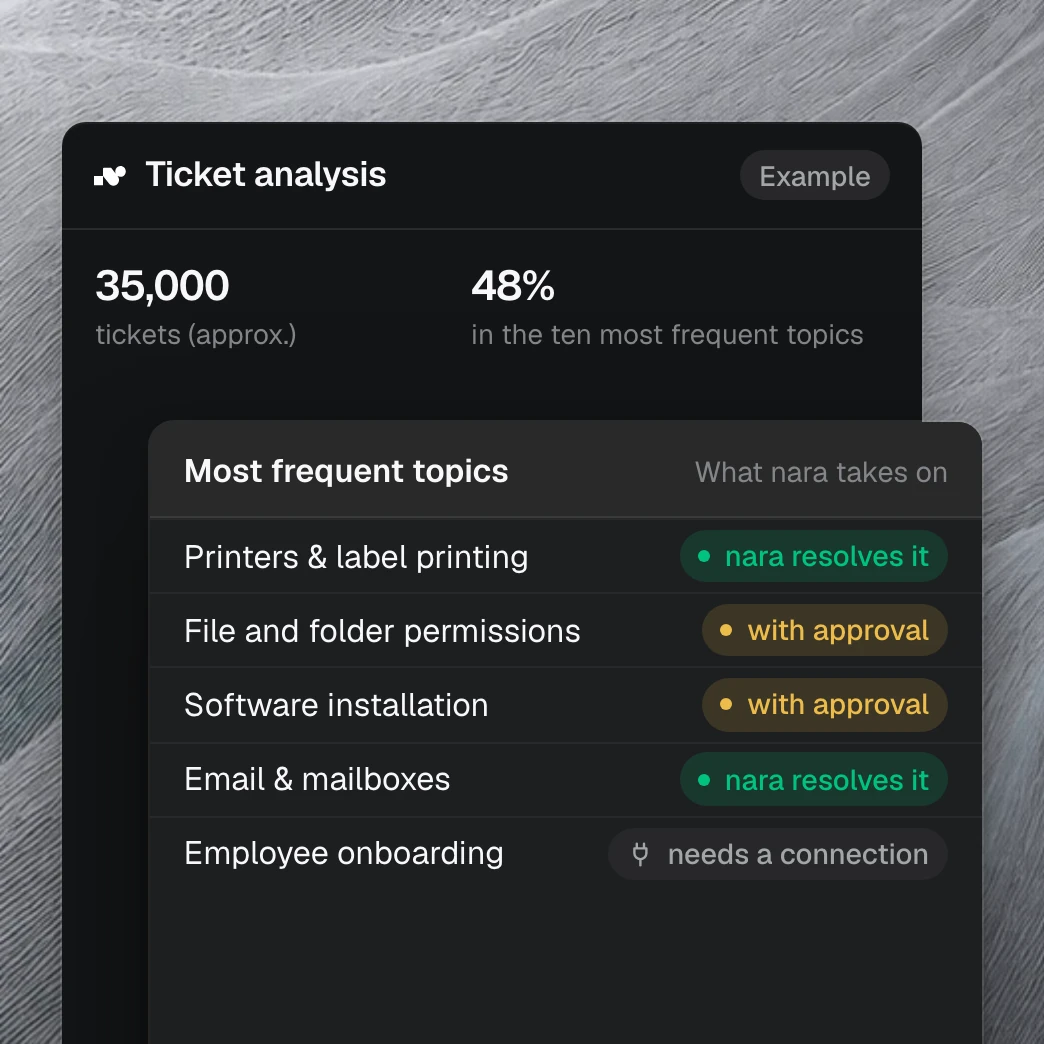
Your tickets show what nara takes on.
With read access to your ticket system, we show within one to two weeks which requests nara handles from day one and how much time your team gets back. It draws on more than 40 million tickets we have analyzed in customer projects.
Questions about nara and Copilot Studio
Yes. Microsoft describes a scenario for an IT helpdesk agent that answers questions, creates tickets, checks their status and hands over to a person. The Employee Self-Service agent is a template for IT and HR. [2][12] The ticket system with SLAs and CMDB still comes from an ITSM, and you design and maintain the workflows, connections, telephony and capacity yourself. nara delivers all of this as a ready-made service desk.
Sources
learn.microsoft.com, Overview - Microsoft Copilot Studio, updated 25 Sep 2026.
learn.microsoft.com, Introduction to Employee Self-Service Declarative Agents and Introduction to Employee Self-Service Custom Engine Agent, both updated 13 Oct 2026.
learn.microsoft.com, Prerequisites to deploy the Employee Self-Service agent, updated 22 Sep 2026.
learn.microsoft.com, Integrate voice agents with Teams Phone Agent (preview), updated 18 Aug 2026; Setup - Direct dial Copilot Studio Voice Agents, updated 25 Sep 2026.
learn.microsoft.com, Use interactive voice response in your agents and Integrate a voice-enabled agent with Dynamics 365 Contact Center, both updated 19 Aug 2026.
learn.microsoft.com, Billing rates and management, updated 1 Oct 2026.
learn.microsoft.com, Automate web and desktop apps with computer use, updated 3 Jul 2026.
learn.microsoft.com, Configure where computer use runs, updated 3 Aug 2026.
microsoft.com, Copilot Studio and Microsoft 365 Copilot pricing pages (Germany), retrieved 13 Oct 2026.
learn.microsoft.com, Move data across regions for Copilots, AI agents, and generative AI features, updated 14 Oct 2026.
learn.microsoft.com, Data locations in Copilot Studio, updated 30 Apr 2026.
adoption.microsoft.com, IT helpdesk agent scenario, retrieved 13 Oct 2026.
learn.microsoft.com, Integrate ServiceNow HR and IT with the Employee Self-Service declarative agent, updated 13 Oct 2026.
learn.microsoft.com, Deployment playbook for Employee Self-Service declarative agents, updated 13 Oct 2026.
learn.microsoft.com, Release notes, known issues, and limitations for the Employee Self-Service agent (custom engine agent), updated 18 Aug 2026.
learn.microsoft.com, Multistage and AI approvals in agent flows (preview), updated 30 Jun 2026.
learn.microsoft.com, What's new in Copilot Studio, updated 6 Oct 2026.
learn.microsoft.com, Anthropic models in Microsoft Online Services, updated 18 Sep 2026.
learn.microsoft.com, Security Copilot in Intune features overview and Copilot in Intune shows device information and helps troubleshoot, both updated 28 May 2026.
learn.microsoft.com, Overview of usage-based billing, updated 28 Sep 2026; Govern Copilot Credit consumption for agents powered by the GitHub Copilot harness, updated 6 Oct 2026.
