nara or Langdock
Langdock gives your people AI tools. nara does the work itself.
Like Langdock, nara answers questions, reads files and researches the web. On top of that, nara takes requests in Teams, by phone and in the portal and resolves them end to end, in your systems and right on the laptop. Every nara plan covers unlimited users.
The difference in brief
Berlin-based Langdock calls itself “the platform for AI adoption”. Your employees use it to chat with many AI models, build agents and workflows and connect more than 50 applications. Langdock bills per user. [1][2][3] In IT support, Langdock agents answer questions from your documents and, once confirmed, create and update tickets in ServiceNow, Jira or Zendesk. [2][4] Langdock does not come with its own ticket system, SLAs or CMDB.
nara answers questions, reads files and researches the web just as well, for every employee. On top of that, nara resolves requests itself and automates processes across your company. Employees message nara in Teams or call it. nara unlocks locked accounts, grants access after approval, fixes failed updates on the laptop and closes the ticket. The ticket system, portal, SLAs and CMDB are included. nara connects any system, APIs and MCP servers automatically, without complex setup. Within one to two weeks, nara works in Microsoft Teams, alongside Langdock or in its place.
Comparison at a glance
Information on Langdock comes from its public documentation, product and pricing pages, Trust Center and contract documents. The numbered sources are listed at the end of the page.
nara
AI-native ITSM
Langdock
As of October 2026
What you get
An AI for every employee that answers questions and resolves requests and runs processes itself, with a complete ITSM in one product
An AI platform for your people’s own work: chat, agents, workflows, integrations and API [1]
Questions, files, research
Yes: answers questions, reads PDF, Word, spreadsheets and images, researches the web and your knowledge, with sources; in chat, in Teams and by voice
Who can use the AI
Every employee; every plan covers unlimited users
What the AI does with an IT request
Resolves it itself: unlocks accounts, resets passwords, grants permissions, fixes devices; every step in the ticket
Ticket system, portal, SLAs, CMDB
Yes, every module in one price
Not included; creates and updates tickets in ServiceNow, Jira Service Management and Zendesk, among other actions [2]
Accounts and permissions
Creates, unlocks and disables accounts, resets passwords, grants permissions, after your approval
Microsoft Teams
Chat, group chats and channels, calls and approvals; nara app in the Microsoft Teams Store
Requests by phone
A dedicated phone number and Teams calls; nara recognizes the caller, unlocks accounts and resets passwords during the call
No calls; Langdock uses voice for things like dictation and transcribing audio files [5]
On employees’ devices
Yes, through nara Edge on Windows, macOS and Linux
Integrations
Any system, with or without an API; nara connects APIs and MCP servers automatically, without complex setup
Systems in your own network
Through nara Edge, outbound connections only, no open ports
From the Langdock cloud, from outside, through a fixed IP address you allow in your firewall [13]
Setting up processes
In your own words; nara builds, tests in a simulated run and goes live after your approval
Approvals
You decide which steps need approval and who gives it; approvals in Teams, by email, by phone or in the portal
Hosting
Cloud in Germany, actions in your network through nara Edge; for large enterprises also entirely in your own data center, AI included
AI data
Processing exclusively in the EU, no training on customer data
Billing
nara plan from €1,500 per month for unlimited users; if nara is also your ITSM, €2.50 per employee per month is added, tiered down to €0.25; 15% less with annual billing; all prices excl. VAT
Where nara and Langdock overlap
Both bring AI agents into Microsoft Teams, and both ask before sensitive actions. The difference is how far the AI takes a request on its own, and how much comes ready-made.

AI in Teams chat
You reach Langdock’s Teams bot in a one-to-one chat or by mentioning it in a channel, and pick an agent there. [7] nara works in Teams chat, group chats, channels and Teams calls, and collects approvals there too.

Answers from your knowledge
Langdock syncs folders from SharePoint, OneDrive, Google Drive and Confluence and searches connected applications. [21] nara draws on your knowledge in SharePoint and Confluence, writes new articles from solved tickets and shows where articles are missing.

From a description to a process
In Langdock, you describe an agent or workflow in chat, and the builder sets it up. [14] In nara, that is how you set up and change processes, forms, SLAs, approvals and permissions, for example: “For orders of €5,000 or more, get the division head’s approval in Teams, then create the order in the purchasing system.” nara tests the process in a simulated run before it goes live.

Approval before actions
Where nara leads
nara closes the ticket itself.
An employee needs access to the project drive and messages nara in Teams. nara works out which permissions are needed, gets approval from the person responsible in the chat, sets up the access and closes the ticket. Langdock’s “IT Help Desk” template answers questions, walks users through diagnosis and resolution steps and escalates to a Jira issue once approved. [4] Custom Langdock agents can add group members through the Entra integration after confirmation, but not in groups synced from on-premises Active Directory; your team builds and maintains such agents itself. [2]
Everyone can reach nara, even without a computer.
An employee on the shop floor has no computer of her own and is locked out of her account. She calls, in Teams or on a regular phone number. nara recognizes her, unlocks the account, resets the password during the call and closes the ticket. Anyone who’d rather talk to a person presses 0. Every nara plan covers unlimited users. Langdock does not take calls. [5] Its Teams bot is open only to members of your workspace, and every user with access to chat and agents takes up a seat. Without a seat, employees reach Langdock agents only through routes your team builds itself, such as a public workflow form or the API. [7][8][9][10]
nara works on the laptop and in your network.
An employee reports in Teams that his laptop no longer installs updates. Through nara Edge, nara checks disk space and the update service, clears the update cache, restarts the installation and records the result in the ticket. nara connects every other system as well: APIs and MCP servers automatically, business applications and servers in your network through nara Edge, even without an API. nara Edge runs on Windows, macOS and Linux and only makes outbound connections, so your firewall stays closed. From its cloud, Langdock reaches your systems from outside, through a fixed IP address you allow, and its desktop app opens the same workspace as the browser. [13][11]
The ticket system is included.
nara includes the ticket system, self-service portal, service catalog, problem and change management, SLAs with escalation, CMDB with discovery, client management and knowledge base in one product, every module in one price. The AI works directly in it. Langdock works with tickets in ServiceNow, Jira Service Management or Zendesk, which you run separately. [2]
nara and Langdock side by side
You don’t have to switch anything off to start with nara.

Keep it or replace it. Your call.
Your people can keep working in Langdock while nara takes over requests to IT, HR and purchasing, right there in Microsoft Teams. Or nara takes on questions, files and research too, and the per-user licences go away. nara is ready within one to two weeks.

Langdock workflows start tasks in nara.
A Langdock workflow calls nara’s REST API through an HTTP Request node, for example to create a ticket or start an onboarding. [22] Your approvals still apply in nara, and every action is recorded in the audit trail.

Move your service desk when you’re ready.
If your service desk runs on ServiceNow, Jira Service Management or another ITSM today, nara works alongside it and documents every case there. You can switch in about six weeks, with ticket history, knowledge articles and assets.
What it costs
Langdock bills per user. A Standard seat with AI models costs €29 per month, or €23.20 per month billed annually, with volume discounts down to €16 (€12.80 billed annually). Business Max, with five times the usage limits, costs €119 per user per month, or €99 per month billed annually. [3] Workflows include 2,500 runs a month; 40,000 runs cost €539 per workspace per month, or €449 per month billed annually. Langdock charges AI usage in workflows by consumption. All prices exclude VAT. [3][8]
Worked example with 1,000 employees who should all work with AI: with Langdock, each person needs a Standard seat. According to its price calculator, that averages €15.32 per user with annual billing, €15,320 per month in total, without the workflow add-on. [3] nara plans cover unlimited users and cost €1,275 to €6,375 per month with annual billing, depending on how much nara does for you. Even the largest standard plan, Scale, comes in about 58% below the Langdock price.
The nara plan starts at €1,500 per month and doesn’t count users. Unlimited users and AI agents, all integrations and SSO are included. If nara is also your ITSM, €2.50 per employee per month is added, tiered down to €0.25, with every module and unlimited IT agents. Annual billing takes 15% off the plan and the ITSM. While your old ITSM contract is still running, nara’s ITSM costs nothing, for up to 12 months. All prices exclude VAT.
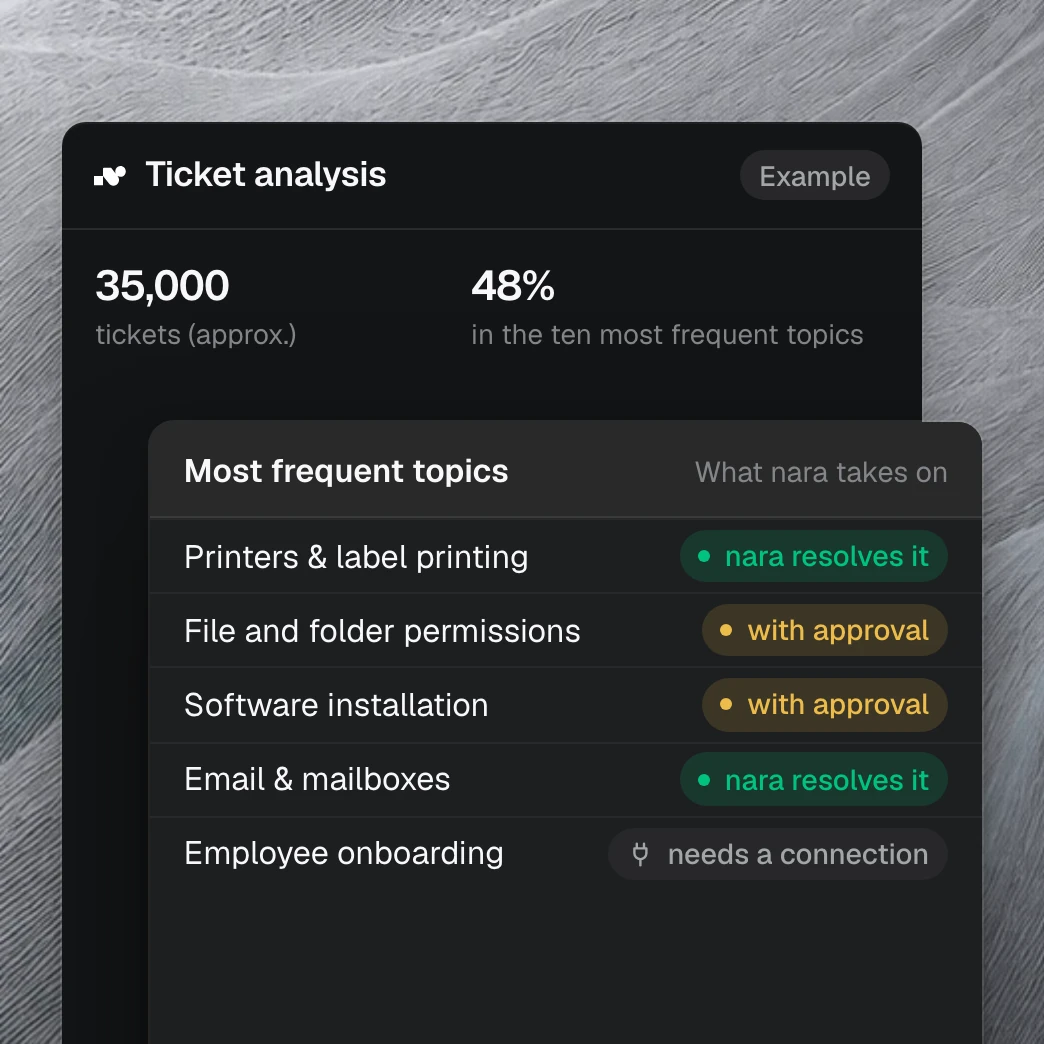
Your tickets show what nara takes on.
With read access to your ticket system, we show within one to two weeks which requests nara handles from day one and how much time your team gets back. It draws on more than 40 million tickets we have analyzed in customer projects.
Questions about nara and Langdock
Yes. Like Langdock, nara answers questions, reads files and researches the web, for every employee and with unlimited users on every plan. On top of that, nara does the work: it resolves requests to IT, HR and purchasing end to end, collects approvals and records every step in the ticket. nara comes with a ticket system, portal, SLAs and CMDB, works in your systems and on devices and reaches everyone, by phone too. Langdock is an AI platform your people use to work with AI themselves and build their own agents and workflows. [1]
Sources
langdock.com, home page.
langdock.com, Integrations, catalog of integrations with all actions and triggers.
langdock.com, Pricing.
langdock.com, AI Agents, “IT Help Desk” template.
docs.langdock.com, Feature Overview.
langdock.com, AI Models, region icon for each model.
docs.langdock.com, How to use the Teams Bot, section Limitations.
docs.langdock.com, Pricing.
docs.langdock.com, Form Trigger.
docs.langdock.com, Introduction to Agents.
docs.langdock.com, Desktop app.
docs.langdock.com, Introduction to Integrations.
docs.langdock.com, Static IP Configuration.
docs.langdock.com, Agent Builder and Workflow Builder.
docs.langdock.com, Using Integrations.
docs.langdock.com, Human in the Loop.
langdock.com, Enterprise.
trust.langdock.com, Trust Center FAQ.
langdock.com, Data Processing Agreement, version 2.1, appendix 2.
langdock.com, Terms of Use, version 2.1.
docs.langdock.com, Folder Sync and Company Knowledge.
docs.langdock.com, HTTP Request, workflow node.
