Process automation compared
Workflow automation compared: build it yourself or have it done.
With Power Automate, UiPath, Zapier, Make and n8n, you build and maintain workflows yourself, even when AI helps with the building. nara starts with the request: employees write in Teams, call, or use the portal and email, and nara resolves it in your systems and on the device, with approvals and an audit trail. Here you will find the tools and the criteria for comparing them.
The difference in brief
With Power Automate, UiPath, Zapier, Make and n8n, you build workflows yourself, increasingly with AI agents. Zapier, Make and n8n connect applications mainly through APIs; Power Automate and UiPath also operate user interfaces through RPA. [2][7] AI assistants deliver drafts. [3][13][16] Error paths and maintenance stay with you. None of the five includes an ITSM with SLAs and a CMDB.
nara starts with the request in Teams, by phone, in the portal or by email, resolves it in your systems and on the device, and records every step in the ticket. You describe processes in your own words; nara builds and tests them and only goes live after your approval. A complete ITSM is included.
Three kinds of tools
The numbered sources are listed at the end of the page.
nara
AI-native service and process platform
Zapier, Make, n8n
Integration platforms
Power Automate, UiPath
RPA and automation platforms
What you get
A finished product: ITSM, service desk and an AI that resolves requests
How a workflow starts
With an employee's request in Teams, by phone, in the portal or by email
With a trigger, such as a new record, an email or a schedule [13]
How a workflow is built
You describe it in your own words; nara builds it, tests it in a simulated run and goes live after your approval
Who builds and maintains it
Your own team, without programming and without a platform team
Your team in the editor; n8n targets technical teams [20]
Billed by
Employees (ITSM) and a nara plan with a fixed monthly allowance
Ticket system and ITSM included
Yes, every module in one price
No; connects to systems such as ServiceNow through connectors [15]
No; connects to an ITSM through connectors
The five tools in brief
Each taken from the vendor's public sources.

Microsoft Power Automate
Cloud flows through connectors and desktop flows through RPA; generative actions are a preview. [2] Copilot drafts flows from a description and, according to Microsoft, is optimized for English. [3] Billing is per user or per bot; flows with standard connectors are also included in many Office 365 licenses. [1][4] Microsoft builds AI agents in Copilot Studio. [24]


Zapier
An integration platform for cloud applications. A Zap consists of a trigger and actions; Zapier Copilot drafts it from a description, as an open beta. [13] Billing is per task, meaning each successfully completed action; Zapier Agents is billed by activities. [11] Data sits on AWS servers in the United States; Zapier does not offer EU-only storage. [14]

Make
A visual toolkit for scenarios built from modules. Maia builds scenarios and AI agents from a description, as a public beta on paid plans. [16] Billing is in credits; most actions cost one credit, some AI features more. When credits run out, scenarios only resume once you add credits. [15] You set the data center, EU or US, when you create the organization. [17]
n8n
A workflow platform for technical teams: visual nodes, plus JavaScript or Python anywhere. [20] n8n Assistant builds workflows from a description, as a preview. [23] AI agents can ask for approval before a tool call, including through Teams. [21] Billing is by workflow executions. n8n Cloud stores data in Frankfurt; the Business plan is self-hosted only. [19]
How to measure the tools
All five have a visual editor, and AI helps with the building: Copilot in Power Automate, Zapier Copilot, Maia in Make and n8n Assistant turn a description into a draft, and UiPath names Autopilot and coding agents as starting points. Zapier Copilot and Maia are in beta, n8n Assistant is a preview. [3][7][13][16][23] Reviewing the draft and taking responsibility for it is up to you; n8n, for example, advises always reviewing generated workflows before production use. [23]
With nara, you describe the process the way you would explain it to a colleague: form, steps, approvals, permissions. nara builds it, shows every step, tests it in a simulated run and goes live after your approval. Your team learns it within days.
Where nara and the tools overlap
On these points, nara and the workflow tools work in similar ways.
Where nara leads
The request is the starting point.
A workflow starts when a trigger fires. With nara, an employee writes in Teams: “I need access to the sales folder.” nara works out which permissions are needed, gets approval from the person responsible, sets up the access and closes the ticket. Nobody has to build a form for exactly this case first.
Resolved right on the device.
A sales rep needs the new version of the quoting software before a customer meeting. nara gets the approval, installs the software on his laptop through nara Edge and records the result in the ticket. nara Edge runs on Windows, macOS and Linux and only opens outbound connections.
Beyond IT.
When HR reports a new colleague starting on the first, nara creates her account in Entra ID, assigns the Microsoft 365 license, grants her rights in the ERP system and orders the laptop in the procurement system. nara collects the manager's approval in Teams. This works with any system, with or without an API, and your firewall stays closed.
Service desk and ITSM are already there.
Ticket system, portal, service catalog, SLAs, change management and CMDB are part of nara. Every request, every approval and every action is recorded in the ticket, and you don't run a second system for status and records.
One sentence instead of a flowchart.
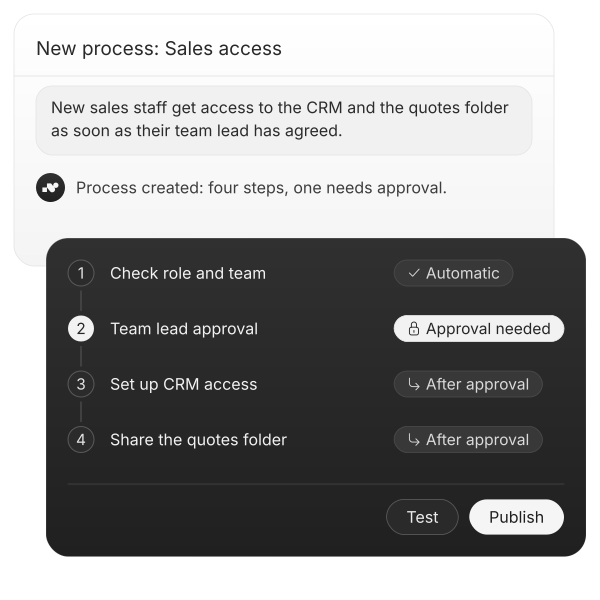
For example, you write: “New sales staff get access to the CRM and the quotes folder as soon as their team lead has agreed.” nara turns this into the process, connects the systems and shows you every step. After a simulated run, it goes live with your approval. No developers, no consultants, no platform team.
Frequently asked questions about nara and workflow tools
Power Automate runs the flows your teams have built, such as notifications or document approvals. nara takes your employees' requests in Teams, by phone, in the portal and by email, resolves them in your systems and on the device, and sees the ticket through to closure. Existing flows keep running, and nara triggers them where it fits. Whatever nara handles better, you move over step by step.
Sources
microsoft.com, Power Automate pricing page (Germany), retrieved 14 Oct 2026.
learn.microsoft.com, What is Power Automate?, updated 27 Nov 2025.
learn.microsoft.com, Create your first cloud flow using Copilot, updated 18 Sep 2026.
learn.microsoft.com, Get started with Power Automate approvals, updated 29 Apr 2026.
learn.microsoft.com, Limits of automated, scheduled, and instant flows, updated 17 Jul 2026.
learn.microsoft.com, Move data across regions for Copilots, AI agents, and generative AI features, updated 14 Oct 2026.
uipath.com, Plans and pricing, retrieved 14 Oct 2026.
docs.uipath.com, About UiPath Agents and Agents: Escalations, retrieved 14 Oct 2026.
docs.uipath.com, Studio Web: The Studio family, retrieved 14 Oct 2026.
docs.uipath.com, Global cloud regions and AI features and model routing, retrieved 14 Oct 2026.
zapier.com, Pricing, retrieved 19 Oct 2026; zapier.com/blog, What is a task in Zapier?, updated 16 Jun 2026.
help.zapier.com, Request approval to keep your workflow running with Human in the Loop, updated 5 Oct 2026.
help.zapier.com, Use the power of AI to generate Zap workflows, updated 29 May 2026.
zapier.com, Data Privacy Overview (FAQ), retrieved 14 Oct 2026.
make.com, pricing page with questions on credits and billing, retrieved 14 Oct 2026.
help.make.com, Meet Maia, your AI and automation co-worker, retrieved 14 Oct 2026.
help.make.com, Organizations, retrieved 14 Oct 2026.
make.com, Human in the loop (Enterprise) integration, retrieved 14 Oct 2026.
n8n.io, Pricing, retrieved 14 Oct 2026.
n8n.io, home page, retrieved 14 Oct 2026.
docs.n8n.io, Human-in-the-loop for tools, retrieved 14 Oct 2026.
docs.n8n.io, v3.0 Breaking changes, retrieved 19 Oct 2026.
docs.n8n.io, Use n8n Assistant, retrieved 19 Oct 2026.
learn.microsoft.com, Agent flows overview (Copilot Studio), updated 3 Aug 2026.
