If you want to know what can be automated in your own service desk, you have three routes. nara, Harmony, Edra and ControlUp's free AI Ticket Analyzer analyze your tickets as a standalone analysis, through read access or an export. ServiceNow and SysAid include such an analysis in their own ITSM. UiPath Communications Mining analyzes messages and tickets on the UiPath platform.
This comparison is written by nara. We are on the list ourselves and say which route fits whom. All information comes from the vendors' own pages, as of 22 November 2026.
What a ticket analysis delivers
A ticket analysis reads your tickets from the past months or years and groups them into topics. At the end, four things should be clear: which topics come up most often, how large the share of recurring requests is, what part of it can be automated, and how much time or money that saves.
The routes differ:
- Standalone analysis: a vendor reads your tickets through read access or an export.
- Feature in your own ITSM: the analysis runs in the ticket system you already have. You need the vendor's AI license for it.
- Message analysis: a platform sorts emails, tickets and transcripts by what people are asking for.
The vendors at a glance
| Vendor | How the tickets get in | What the result shows | For whom | Price of the analysis |
|---|---|---|---|---|
| nara ticket analysis | Read access to tickets and knowledge articles | Top topics, what nara resolves per topic, ROI calculator | Independent of the ITSM | First call is free |
| Harmony | You send the last 1,000 tickets | Share of the workload that can be automated | IT teams that send in tickets | No price in the post |
| Edra | Reads tickets, logs and messages | Processes as readable playbooks, knowledge gaps | ServiceNow, Jira, Zendesk, Salesforce and others | No public list price |
| ControlUp AI Ticket Analyzer | CSV export of incidents | HTML report with themes and automation opportunities | Any system with CSV export, even without ControlUp | Free |
| ServiceNow AI Agent Advisor | Reads records in your ServiceNow instance | Patterns by volume, estimated savings, matching agents | ServiceNow with a Now Assist license | Consumes no assists |
| SysAid | Reads the service requests of a date range | Clusters with a proposed agent, report and CSV | SysAid customers with Copilot | Prices on the vendor's website |
| UiPath Communications Mining | Connector, API or upload | Intent per message, candidates for automation | Runs in UiPath IXP | On request from the vendor |
Standalone analysis through read access or export
nara
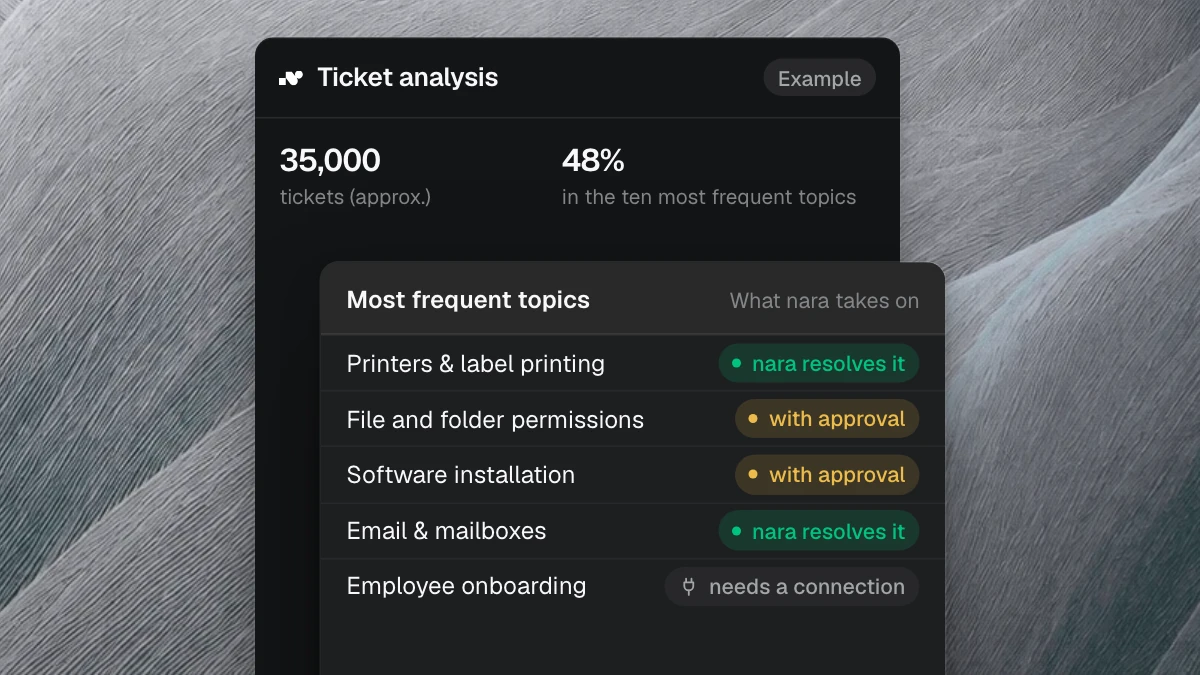
nara's ticket analysis only needs read access: nara reads your tickets and knowledge articles and changes nothing there. The interactive report shows your most frequent topics and how long they take today. For each topic it says what nara resolves itself and where an integration or approval is needed. On top of that come an ROI calculator with visible, adjustable assumptions, drafts for missing how-to articles and a start plan. The result is ready in one to two weeks.
Two anonymized examples: at a machine builder, 55% of 63,053 tickets fell into ten topics, and the calculated value with integrations was €414,000 to €573,000 a year. At an industrial company, 77% of 68,719 tickets were in topics nara can take over. The first step is the free first call. Our approach is described in the methodology article.
Harmony
In its blog, Harmony (harmony.io) offers to analyze your last 1,000 tickets and show how much of your workload could be automated today. In the examples there, Harmony cites shares between 50 and 74%.
Edra
Edra says it reads tickets, logs and messages and works out from them how your business runs. The result is human-readable playbooks, plus pointers to inconsistencies and knowledge gaps. As source systems Edra lists ServiceNow, Jira, Zendesk and Salesforce. A pilot is meant to show your processes in one week.
ControlUp AI Ticket Analyzer
ControlUp provides the AI Ticket Analyzer for free, including for companies without ControlUp. You export your incidents as CSV, for example from ServiceNow, Jira Service Management, Zendesk or Freshservice, and have an AI assistant such as Claude or ChatGPT analyze them. The output is an HTML report with ticket statistics, top categories, recurring themes, preventable issues and automation opportunities. According to ControlUp, the export is not sent to ControlUp. The current version does not remove personal data.
Analysis inside your own ITSM
ServiceNow AI Agent Advisor
The AI Agent Advisor reads records in your ServiceNow instance and looks for recurring patterns. According to an FAQ post in the ServiceNow Community, it requires at least 500 resolved or closed records with work notes or comments. Each row in the result is an automation opportunity with estimated savings, and the Advisor matches it to existing agents and tools. You need a license that includes Now Assist. According to ServiceNow, the analysis itself consumes no assists. How nara works alongside ServiceNow is covered in our comparison with ServiceNow.
SysAid
SysAid ships a prebuilt agent called "Recommend AI Agents based on service record Insights". You provide a date range. The agent reads all service requests from that period, groups them by category and theme and proposes an agent for each cluster, ranked by ticket volume and impact. The result comes as a report and as a CSV. According to SysAid, prebuilt agents are available to customers with Copilot. What the plans cost is on the vendor's pricing page.
Message analysis
UiPath Communications Mining
Communications Mining is part of UiPath IXP. It reads emails, tickets, notes and transcripts through a connector, the API or uploaded data. A trained model labels every message. According to UiPath, the analytics show, for example, which requests are good candidates for automation or self-service.
How to recognize a good ticket analysis
- It works on your real tickets. Have the vendor show you which tickets from which period were analyzed.
- It shows topics with volume. Each topic should come with its number of tickets, ideally per month.
- It says what each topic needs. Some requests are done with an answer. Others need an action in a system, an approval or an integration.
- It calculates with your handling time. The assumptions behind a saving in euros should be visible, and you should be able to change them.
- The result is yours. You should be able to keep the report and share it internally, even if you decide against the vendor.
Data protection: what must be settled before the analysis
Tickets contain names, phone numbers and device names, and sometimes a password in free text. Before a vendor reads your tickets, three points should be settled in writing: a non-disclosure agreement, a data processing agreement naming all sub-processors, and the location where tickets are stored and the language model runs. Also ask whether a model is trained on your tickets and when the data is deleted. If you upload an export to an AI assistant yourself, that assistant's terms apply.
For the analysis, nara only reads your tickets and changes nothing. nara is developed and hosted in Germany, AI processing runs in the EU, and no model is trained on your data. As a general rule, nara redacts passwords and personal details in documents and tickets before the AI reads them. You can request the data processing agreement and the documents for CISO, data protection and works council on the Security page. Whether that is enough for you is for your data protection officer to decide.
Which one fits whom?
- If you have licensed ServiceNow with Now Assist and want to automate there, start with the AI Agent Advisor. The analysis runs in your own instance.
- If you use SysAid with Copilot, run the prebuilt agent.
- If you want a first impression without talking to a vendor, use ControlUp's AI Ticket Analyzer and anonymize the export first.
- If you already run UiPath and want to analyze emails together with tickets, look at Communications Mining.
- If you want to know which topics AI can take over, what that requires and what it saves, have your tickets analyzed by a vendor that then also does the work, such as nara.
Frequently asked questions
How many tickets does an analysis need?
That depends on the vendor. ServiceNow states at least 500 resolved or closed records for the AI Agent Advisor, and Harmony asks for the last 1,000 tickets. nara's two examples cover more than four and more than eight years of ticket history.
Do we have to switch ticket systems for a ticket analysis?
No. Standalone analyses read your tickets through read access or an export. The features from ServiceNow and SysAid run inside the respective system.
What does a ticket analysis cost?
ControlUp provides the AI Ticket Analyzer for free. With ServiceNow and SysAid, the analysis is tied to a license: Now Assist at ServiceNow, Copilot at SysAid. Edra has no public list price. At nara, the ticket analysis runs as part of a pilot project or after purchase, and the first call before that is free.
See what is in your tickets
Look at the example of a ticket analysis or book the free first call of 30 minutes. Our article ITSM software with AI compared looks at which systems then resolve requests themselves.